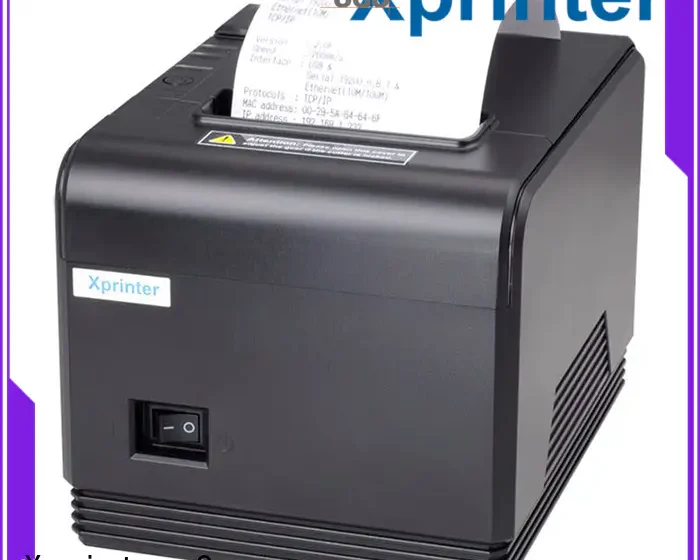

Small businesses often need reliable receipt and bill printing without dedicating significant counter space to bulky equipment. A compact printer can support everyday transactions while fitting more easily into small retail stores, cafés, restaurants, kiosks, and mobile service environments.
When choosing a Mini Bill Printer, buyers should consider more than its physical size. Printing technology, connectivity, paper compatibility, speed, durability, and ease of operation can all influence how well the device fits a business’s workflow.
Compact and Space-Saving Design
The main advantage of a mini printer is its small footprint. A compact design can leave more room for payment terminals, products, menus, or other equipment on a crowded counter.
If the printer will be moved between locations, weight and overall dimensions are also important. A lightweight model can be easier for employees to carry and reposition during daily operations.
Suitable Printing Technology
Many compact bill printers use direct thermal printing. This technology creates text and graphics by applying heat to specially coated thermal paper.
Because it does not require conventional ink cartridges or toner, thermal printing can simplify consumable management. Buyers should still confirm that the printer supports the type and size of paper required for their bills or receipts.
Reliable Print Quality
Clear printing is essential for receipts and bills. Customer names, transaction details, prices, totals, and other information should remain easy to read.
If the printer will produce barcodes or logos, buyers should also check whether its print resolution and supported formats are suitable for those requirements.
Adequate Printing Speed
Printing speed can affect transaction times, particularly in busy restaurants and retail shops. A printer that produces receipts quickly can help employees move through transactions efficiently.
However, speed should be evaluated alongside reliability and print quality. A high-speed device may not be beneficial if it frequently encounters connection or paper-feeding issues.
Wireless Connectivity
Bluetooth and Wi-Fi can make a compact printer easier to integrate into modern POS environments. Wireless connections allow compatible smartphones, tablets, and terminals to send print jobs without requiring a permanent cable.
The best connection method depends on the business’s existing devices, software, and physical setup. Compatibility should always be verified before purchase.
POS and Software Compatibility
A printer needs to work with the software that generates bills and receipts. Check compatibility with the business’s POS system, operating system, mobile devices, and relevant applications.
Confirming compatibility in advance can help prevent integration problems and avoid additional setup costs.
Paper Size and Capacity
Different mini printers support different paper widths and roll dimensions. Buyers should select a model that matches their existing receipt format or business requirements.
Important specifications may include:
- Paper width
- Maximum roll diameter
- Core size
- Paper thickness
- Supported thermal paper type
Adequate roll capacity can also reduce how often employees need to replace paper during busy periods.
Battery Life for Portable Use
If the printer will remain on a counter, battery performance may be less important than connectivity and power options. For mobile applications, however, battery capacity becomes a key consideration.
Businesses should compare expected printing volume, charging time, and battery capacity. Some applications may benefit from a replaceable battery or other flexible power options.
Durable Construction
A printer used in a busy shop or restaurant may experience frequent handling, movement, and exposure to dust or spills. A durable design can help the device withstand everyday operating conditions.
For mobile use, buyers may also want to consider protection against accidental drops, moisture, and other environmental risks, depending on where the printer will be used.
Easy Paper Replacement
Employees should be able to replace paper quickly and correctly. A simple paper-loading mechanism can reduce interruptions and make the printer easier to operate during busy service periods.
Clear status indicators for conditions such as low paper or paper-out can also help staff identify problems promptly.
Simple Maintenance
Thermal printers generally require less maintenance than many ink-based alternatives, but routine cleaning is still necessary. Dust and paper residue can affect print quality and paper feeding.
A design that provides easy access to recommended maintenance areas can make regular care more convenient for small businesses.
Security Considerations
If the printer receives transaction information through a wireless connection, businesses should consider how data is transmitted between the POS system and printer.
Secure network configuration and compatible software are particularly important when transaction or customer information is involved.
Conclusion
The best mini bill printer should match the actual needs of the business rather than simply offering the smallest size or lowest price. Print quality, speed, connectivity, paper compatibility, durability, and ease of maintenance are all important factors to consider.
For businesses that require portability, battery life and wireless connectivity may be priorities. For fixed counters, space efficiency, POS compatibility, and reliable daily operation may matter more. Evaluating these features together can help buyers choose a compact printer that supports their workflow effectively.