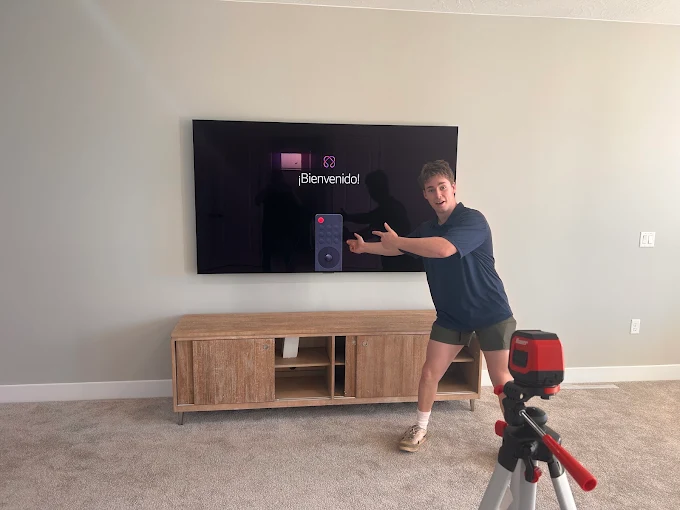

A wall-mounted TV can change the look of any room. It saves space. It creates a modern style. It also makes daily viewing more enjoyable. Still, a great setup takes more than hanging a screen on the wall. Good planning makes a big difference. A safe and clean setup protects your TV, improves comfort, and keeps your home looking organized.
Many homeowners focus only on buying a new television. They often forget that TV Mount Installation also affects safety, viewing comfort, and the overall look of the room. Careful planning before mounting helps avoid common mistakes. It also creates a setup that works well for many years.
Why a Safe and Clean TV Wall Setup Is Important
A good TV wall setup is about more than appearance. It also helps protect your investment. Many homeowners choose Professional TV Mounting because it helps create a secure installation with a neat finish.
A properly planned setup improves comfort. It keeps the screen steady. It reduces clutter. It also makes cleaning easier. Small details often create the biggest improvements.
A clean entertainment area feels relaxing. Family members enjoy spending time together. Guests also notice the tidy appearance.
Start With the Right Wall
The wall is the foundation of your setup.
Not every wall is a good choice.
Take time to study the room before making a decision.
Look at where people usually sit.
Notice where sunlight enters.
Check nearby power outlets.
Choose a wall that provides a clear view from most seats.
Stay Away From Heavy Glare
Bright sunlight causes reflections.
Those reflections reduce picture quality.
Place the television away from direct sunlight whenever possible.
Curtains and blinds also help during bright afternoons.
Leave Enough Open Space
Avoid placing the television inside crowded areas.
Give the screen enough room.
The wall should feel open.
This creates a clean and balanced look.
Find the Best Viewing Height
Many people mount their television too high.
That mistake often causes neck pain.
The center of the screen should sit close to eye level while seated.
This position feels natural.
Long movies become more comfortable.
Measure Before You Begin
Sit where you normally watch television.
Ask someone to help measure eye level.
Mark the wall carefully.
Simple measurements prevent future problems.
Pick the Right TV Mount
Every home has different needs.
The right mount depends on your room.
It also depends on how you watch television.
Fixed Mount
A fixed mount keeps the television close to the wall.
It creates a simple and modern appearance.
This option works well for straight viewing.
Tilting Mount
A tilting mount allows slight movement.
It helps reduce glare.
It also improves viewing if the television sits higher.
Full Motion Mount
A full motion mount provides the most flexibility.
The television moves left and right.
It also pulls away from the wall.
This works well in large spaces.
Think About Future Changes
Furniture often moves.
Rooms change over time.
Choose a mount that still works later.
Planning ahead saves effort.
Understand Your Wall Type
Every wall is different.
Drywall alone cannot support heavy weight.
Strong wall studs provide better support.
Brick and concrete walls need different hardware.
Always know your wall before drilling.
Use Strong Hardware
Quality screws improve safety.
Cheap hardware may fail.
Always follow the instructions provided with the mount.
Keep Cables Hidden
Visible wires make even expensive setups look messy.
Loose cables also collect dust.
They may become tripping hazards.
Organized cables improve appearance.
They also increase safety.
Choose Safe Cable Solutions
Cable covers work well.
In-wall cable systems also create a neat finish.
Always use approved methods.
Never damage electrical wiring.
Plan Cable Routes Early
Think about every connected device.
Game consoles need cables.
Streaming devices need cables.
Planning early avoids clutter later.
Place Devices Neatly
Most entertainment systems include more than a television.
Many homes have gaming systems.
Others use streaming boxes.
Some have soundbars.
Arrange every device carefully.
Keep everything easy to reach.
Leave Room Around Equipment
Electronics create heat.
Airflow helps them stay cool.
Do not stack devices tightly together.
Improve Sound Quality
Picture quality is only part of the experience.
Clear sound makes movies more enjoyable.
Sports feel more exciting.
Conversations become easier to hear.
Add a Soundbar
Many homeowners choose a soundbar.
It improves sound without taking much space.
It also keeps the room looking clean.
Position Speakers Correctly
Avoid placing speakers behind furniture.
Clear sound travels better through open space.
Small adjustments improve the listening experience.
Reduce Screen Reflections
Glare affects every television.
Even expensive screens struggle with strong reflections.
Simple changes solve many problems.
Move bright lamps.
Close curtains when needed.
Adjust room lighting.
Test the Room During the Day
Morning light changes.
Evening light changes.
Watch different programs.
Check the picture from several seats.
Create a Family-Friendly Space
Safety matters in every home.
Children often play near televisions.
Pets may bump into furniture.
A secure wall setup helps reduce accidents.
Keep Cords Out of Reach
Children may pull loose wires.
Organized cables improve safety.
Cable covers help protect everyone.
Inspect the Mount Regularly
Check screws every few months.
Look for loose hardware.
Fix small problems early.
Regular checks increase safety.
Keep the Area Easy to Clean
Dust builds up around electronics.
A clean setup stays attractive longer.
Leave enough room behind devices.
Clean shelves often.
Wipe the screen with a soft cloth.
Never spray cleaner directly onto the television.
Keep Air Vents Clear
Blocked vents trap heat.
Heat shortens the life of electronics.
Good airflow helps everything perform better.
Match Your Home Style
A television should fit naturally into the room.
Simple designs often look best.
Avoid adding too many decorations.
Clean walls create a calm feeling.
Choose Simple Decorations
Small shelves work well.
Framed artwork also adds balance.
Keep the focus on comfort.
Plan Before Buying New Equipment
Think about future upgrades.
You may add speakers.
You may buy another gaming console.
Extra planning saves time later.
Leave Extra Outlet Space
More outlets reduce cable clutter.
Everything stays organized.
The room remains neat.
Common Mistakes to Avoid
Many people make the same errors.
Learning from them prevents frustration.
Mounting Without Measuring
Always measure first.
Guessing creates problems.
Ignoring Wall Strength
Not every wall supports heavy televisions.
Know what is behind the wall.
Leaving Cables Hanging
Visible wires reduce the clean appearance.
Plan cable management before mounting.
Blocking Airflow
Electronics need space.
Good airflow prevents overheating.
Practical Tips From Experience
After working with many TV wall setups, one lesson becomes clear.
Preparation matters.
Taking extra time before mounting prevents many problems.
Double-check every measurement.
Use quality hardware.
Never rush the installation.
Clean cable routing always improves the final result.
Simple planning creates a better viewing space.
Families notice the difference every day.
Why Maintenance Matters
A TV wall setup is not a one-time project.
It needs simple care.
Dust the screen regularly.
Inspect the mount every few months.
Keep cables organized.
Replace damaged parts quickly.
Small maintenance tasks protect your investment.
They also help your setup stay safe.
Final Thoughts
A safe and clean TV wall setup begins with careful planning.
Choose the right wall.
Measure everything.
Use quality hardware.
Keep cables hidden.
Improve lighting.
Protect your family.
Maintain the setup regularly.
These simple ideas create a comfortable viewing space.
They also make your home feel more organized.
The best setup is not always the most expensive.
It is the one that combines safety, comfort, and clean design.
With smart planning, your entertainment area can look great and stay reliable for many years.
Frequently Asked Questions
What is the safest height for a wall-mounted TV?
The center of the screen should usually match your seated eye level for comfortable viewing.
How can I make my TV wall look cleaner?
Hide cables, organize devices, and avoid placing too many decorations around the television.
Can every wall support a television?
No. Different wall materials require different mounting methods and hardware.
How do I reduce glare on my screen?
Keep the television away from direct sunlight. Use curtains or adjust room lighting when needed.
Why is cable management important?
It improves safety, reduces clutter, and gives the room a neat appearance.
How often should I inspect the TV mount?
Check the hardware every few months. Tighten loose screws if needed.
Should electronics have space around them?
Yes. Proper airflow helps prevent overheating and supports longer equipment life.
What is the biggest mistake during TV wall setup?
Skipping measurements is one of the most common mistakes. Measuring carefully helps create a safe and professional result.