
Introduction
If you’ve been searching for a reliable place to buy Cricut Online UAE, you’ve probably noticed the market is crowded with resellers who don’t really understand the machines they’re selling. That’s a problem when you’re spending real money on a cutting machine you’ll use for years.
This guide walks you through the entire Cricut lineup available in the UAE, what each machine actually does, and how to pick the right one without wasting a single dirham on the wrong setup.
Why Cricut Has Become the Go-To Machine for UAE Crafters
Cricut isn’t just a cutting machine — it’s turned into a full ecosystem for anyone who wants to design, cut, and personalize things at home or for a small business. Whether you’re making party decor, custom t-shirts, vinyl decals for cars, or personalized mugs, the machine handles the precision work that used to require professional equipment.
In the UAE specifically, demand has grown fast because of the booming home-business and gifting culture — people want personalized items for weddings, Eid, birthdays, and corporate gifting, and Cricut makes that possible without outsourcing to a print shop.
What makes it stick, though, isn’t just the hardware. It’s paired with Cricut Design Space, the companion app where you actually build your designs before sending them to the machine. You don’t need design experience — there are thousands of ready-made templates, fonts, and images inside the app, so even a total beginner can produce something clean on day one.
The Cricut Machine Lineup Explained
Picking a machine isn’t one-size-fits-all, and this is where most first-time buyers get stuck. Each model in the current lineup is built for a different scale of project, and knowing the differences upfront saves you from buying something that can’t grow with you. Here’s a straightforward breakdown of what’s actually on shelves right now and who each one suits.
The Cricut Joy™ is the smallest and most beginner-friendly option — compact, portable, and ideal for quick projects like labels, cards, and small vinyl decals. If your crafting needs are simple and space is tight, this is the entry point.
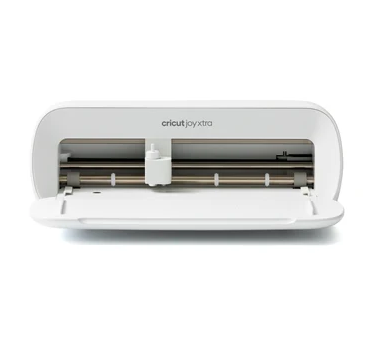
Step up to the Cricut Joy Xtra™ and you get a machine that still fits in a small space but handles a wider range of materials — full-colour stickers, custom cards, and even light t-shirt work. It’s the sweet spot for hobbyists who’ve outgrown the Joy but don’t need industrial capability.
The Cricut Explore™ 4 is built for people making things “in multiples” — vinyl decals, stickers, cards, and shirts at a faster pace, which matters if you’re running a small side business rather than a one-off hobby.
At the top of the range sits the Cricut Maker™ 4, the most powerful machine in the current catalog. It can cut wood, engrave metal, and deboss leather in addition to handling everyday projects. If you’re serious about scaling a craft business or working with tougher materials, this is the machine that won’t hold you back.
Heat Presses and Personalization Tools
Cutting is only half the story — a lot of what people actually want to make (custom shirts, mugs, hats) needs heat application, and that’s where the heat press lineup comes in. This category has grown a lot in the UAE because personalized apparel and merchandise have become genuinely profitable side businesses, not just hobbies.
The range includes EasyPress machines for flat items like t-shirts and tote bags, and a compact EasyPress Mini for smaller or curved areas that a full-size press can’t reach comfortably. For drinkware, there’s a dedicated Mug Press that wraps heat evenly around curved surfaces — something you genuinely can’t achieve with a flat iron or a regular press.
If hats are your thing, the Cricut Hat Press is shaped specifically for curved brims and panels. And for anyone pressing at higher volume, the Cricut Autopress automates pressure and timing so results stay consistent order after order, which matters a lot once you’re selling rather than just crafting for yourself.
Tools, Blades, and Accessories You’ll Actually Need
New buyers often underestimate how much the accessories matter. A machine on its own can cut basic shapes, but the right blades and tools are what let you take on more advanced projects. Blades and tools cover everything from fine-detail cutting to scoring and engraving, and swapping between them is quick once you know what each one does. If you’re making stickers, custom labels, or textured cards, you’ll also want to look at pens and markers compatible with Design Space, which let the machine draw as well as cut.
Machine mats deserve more attention than people give them — using the wrong grip strength for your material is one of the most common reasons projects come out uneven or torn. Lighter grip mats suit paper and thin vinyl, while stronger grip mats hold thicker materials like cardstock or fabric backing in place during a cut.
For anyone doing repeat projects, quickswap tools and replacement parts keep your existing machine running longer instead of pushing you toward an upgrade you don’t need yet. And if you’re setting up a proper workspace, don’t skip storage and organization accessories — keeping mats, blades, and materials sorted actually speeds up your workflow more than people expect.
Materials That Make the Difference
A cutting machine is only as good as what you feed it, and this is where a lot of new crafters get stuck experimenting with the wrong materials. Iron-on vinyl (HTV) is the standard choice for shirts and fabric personalization — it bonds under heat and holds up through washes when applied correctly. Standard adhesive vinyl is better suited to decals, signage, and hard surfaces like tumblers or laptops.
If you’re making cards or paper crafts, dedicated paper and cardstock ranges are cut to work cleanly with the machine’s blade depth settings, which matters more than people assume — using printer paper instead of proper cardstock is a common rookie mistake that leads to torn or uneven cuts. There are also foil transfer sheets for anyone wanting a metallic finish on invitations or gift tags without needing a separate foiling machine.
What Fast Delivery Actually Looks Like in the UAE
Shipping speed matters more for crafting supplies than people realize — if you’re prepping for an event or fulfilling a customer order, a delayed delivery can genuinely throw off your timeline. A dependable supplier in this space should offer clear delivery windows across Dubai, Abu Dhabi, Sharjah, and the other Emirates, along with straightforward shipping policies that spell out costs and timeframes upfront rather than surprising you at checkout.
It’s also worth checking whether free shipping thresholds apply, since bulk orders — especially for small businesses buying blanks, vinyl, or HTV in volume — can add up fast in shipping costs alone if you’re not paying attention.
Choosing the Right Machine for Your Needs
Here’s a rhetorical question worth asking yourself before you spend anything: are you crafting for fun, or are you trying to build something that pays for itself? That single answer changes everything about which machine makes sense.
If you’re just starting out and want to test the waters, the Joy or Joy Xtra covers most hobby needs without a big upfront cost. If you’re already selling on Instagram or at local markets, the Explore 4 or Maker 4 pays for itself faster than you’d think, especially once you factor in how much you’d otherwise spend outsourcing cuts or prints. And if wood, leather, or metal engraving is part of your vision, don’t cheap out on the Maker 4 — trying to force those materials through a lighter machine usually ends in frustration and wasted material.
It also helps to actually try the Cricut machine quiz or a comparison chart before committing, since specs on paper don’t always translate to how a machine feels in daily use.
FAQs
Is it safe to buy Cricut machines online in the UAE?
Yes, as long as you’re buying from an authorized retailer that ships genuine Cricut stock with proper warranty coverage. Always check that the seller offers official support channels rather than grey-market imports with no local warranty backing.
Which Cricut machine is best for beginners?
The Cricut Joy™ or Joy Xtra™ are the easiest starting points — compact, simple to set up, and capable of handling everyday projects like cards, labels, and small decals without a steep learning curve.
Do I need Cricut Design Space to use the machine?
Yes, Design Space is the app that lets you build or select designs before cutting. It’s free to use, works on desktop and mobile, and includes a large library of ready-made templates.
Can Cricut machines cut materials other than paper and vinyl?
Higher-end models like the Maker™ 4 can cut wood, engrave metal, and deboss leather, while entry-level machines are better suited to paper, cardstock, and vinyl.
How long does delivery usually take within the UAE?
Delivery timeframes vary by location, but most orders across the Emirates arrive within a few business days when ordered from a local, authorized supplier.
Final Thoughts
Choosing the right Cricut setup comes down to being honest about what you’ll actually use it for, not what looks impressive in the box. Start with the machine that matches your current projects, add tools and materials as your skills grow, and don’t underestimate how much a good mat or the correct vinyl type affects your results.
Whether you’re a first-time hobbyist or scaling a small personalization business, the UAE market now has enough variety — and fast enough delivery — that there’s no real reason to compromise on getting the right machine the first time.