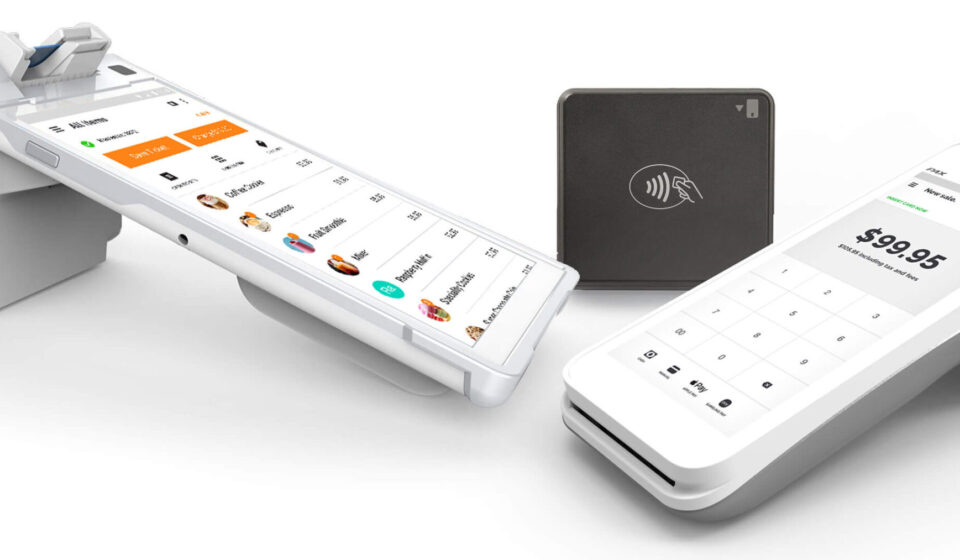

A point-of-sale system is an important part of daily operations for businesses that process customer transactions. From recording purchases to accepting payments and producing receipts, POS hardware provides the physical tools employees use to complete these tasks efficiently.
Selecting the right equipment requires more than comparing individual specifications. Businesses should consider how each component fits into the complete POS environment. Exploring ComPOSxb can provide useful context when evaluating integrated POS solutions and the hardware they may include.
Why POS Hardware Selection Matters
POS hardware is used repeatedly throughout the business day, often under demanding conditions. Equipment that is slow, difficult to operate, or poorly matched with existing software can create unnecessary interruptions.
A well-planned hardware setup should support reliable transactions while remaining practical for employees and customers. The right combination depends on factors such as business type, transaction volume, workspace, and payment requirements.
POS Terminal
The POS terminal is typically the central component of the system. It provides employees with access to POS software and allows them to enter, review, and complete transactions.
When evaluating a terminal, businesses can consider processing performance, display size, touchscreen responsiveness, operating system compatibility, and available ports. The terminal should provide enough capability for both current and anticipated workloads.
Touchscreen Display
A responsive touchscreen can make everyday POS tasks easier to perform. Employees may use the display to search for products, enter orders, apply discounts, process returns, and access other system functions.
Screen size and placement should also match the available counter or workstation. A larger display may improve visibility, while a compact design can be useful where counter space is limited.
Barcode Scanner
Barcode scanners are particularly valuable in retail environments where employees need to process numerous products quickly. Instead of manually entering product codes, staff can scan an item and retrieve its corresponding information from the POS system.
Businesses should consider scanning speed, accuracy, connectivity, and compatibility with the selected POS software when choosing a scanner.
Receipt Printer
Receipt printers provide customers with physical records of their purchases. They can also support operational needs where printed transaction information is required.
Important considerations include printing speed, paper format, connection type, durability, and software compatibility. A reliable printer can help prevent delays when multiple customers are waiting at checkout.
Cash Drawer
Businesses that accept cash may need a secure and dependable cash drawer connected to the POS system. Automated opening through the POS terminal can help coordinate cash handling with completed transactions.
The drawer should have a suitable internal layout for organizing bills and coins. Businesses should also consider durability because the component may be opened frequently throughout the day.
Payment Terminal
Modern businesses often support multiple payment methods, making payment hardware an essential consideration. Card readers and contactless payment devices should integrate appropriately with the POS environment.
Businesses should verify which payment methods are supported and whether the hardware can accommodate changing customer preferences.
Customer-Facing Display
A customer display can show transaction details while an employee processes a purchase. Depending on the system, it may present item information, prices, totals, or payment instructions.
This type of hardware can improve transaction transparency by allowing customers to review important details before completing payment.
Connectivity Equipment
POS components need reliable communication with one another. Depending on the setup, equipment may connect through USB, Ethernet, Wi-Fi, Bluetooth, or other supported interfaces.
Businesses should plan connectivity before installation. Poorly planned connections can lead to unnecessary cable clutter or communication problems between devices.
Kitchen and Order Management Hardware
Restaurants and hospitality businesses may require additional POS hardware beyond a standard checkout setup. Kitchen displays, order printers, and dedicated terminals can help transfer information between front-of-house and back-of-house operations.
The appropriate equipment depends on the restaurant’s workflow. A smaller operation may need a simple configuration, while a larger venue may require several connected stations.
Hardware Compatibility
Compatibility should be evaluated before purchasing individual components. A scanner or printer may work well on its own but still create problems if it is not properly supported by the chosen POS platform.
Businesses should check hardware requirements, supported operating systems, connection standards, and integration capabilities before finalizing their equipment selection.
Reliability and Maintenance
Because POS hardware supports revenue-generating activities, reliability should be a major consideration. Equipment failures can interrupt transactions and affect customer service.
Businesses should review warranty terms, technical support, maintenance requirements, and replacement options. Durable equipment may also provide better long-term value when used heavily.
Security Features
Security should be considered across the entire POS environment. Payment devices and terminals should be configured according to appropriate security practices, while access to POS systems should be limited to authorized employees.
Businesses should also keep software and connected systems updated where applicable. Hardware selection should complement, rather than replace, broader security procedures.
Planning for Business Growth
POS hardware should ideally accommodate future operational changes. A growing business may eventually need more terminals, additional payment devices, or new peripherals.
Choosing equipment that supports expansion can reduce the need for a complete replacement later. Businesses should therefore consider both immediate requirements and potential growth when comparing POS solutions.
A Practical Selection Checklist
Before choosing POS hardware components, businesses can evaluate the following:
- POS software compatibility
- Expected transaction volume
- Available workspace
- Supported payment methods
- Connectivity requirements
- Employee usability
- Hardware durability
- Warranty and support
- Future expansion options
- Total ownership costs
This checklist can help decision-makers compare equipment based on practical business requirements rather than focusing only on individual specifications.
Final Considerations
POS hardware components work best when they are selected as parts of a complete system. A terminal, scanner, printer, cash drawer, payment device, and other peripherals should complement one another and support the way employees actually process transactions.
Businesses evaluating POS solutions should look beyond the initial purchase price and consider compatibility, reliability, usability, security, maintenance, and scalability. A carefully planned hardware setup can provide a stronger foundation for efficient and dependable point-of-sale operations.