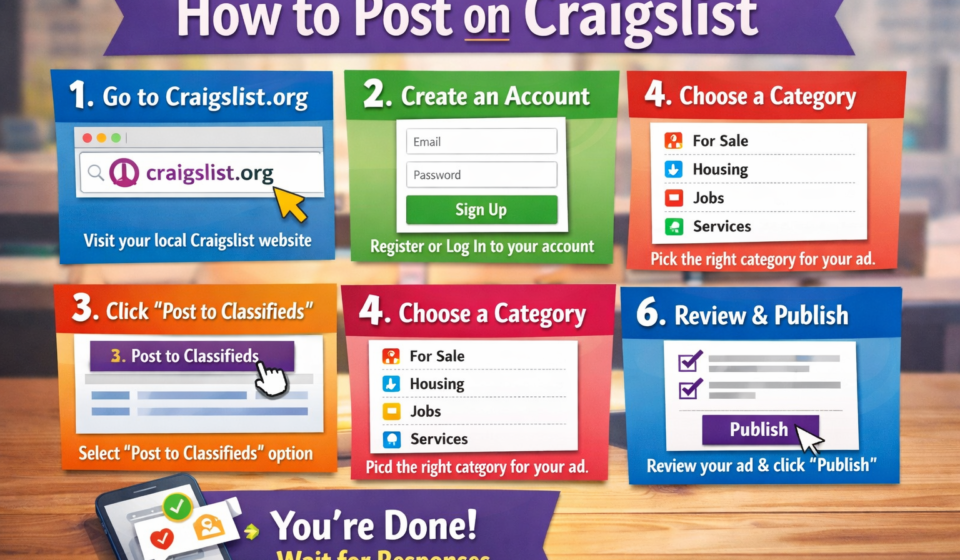

Posting an ad online is one of the easiest ways to sell items, find services, or advertise a job. One of the most popular platforms for this purpose is Craigslist. Even though it looks simple, many beginners get confused when they try to post for the first time.
This guide explains how to post on Craigslist in clear, simple steps. By the end, you will know how to create an account, choose the right category, write an effective ad, and stay safe while posting.
What Is Craigslist and Why Use It?
Craigslist is a classified ads website where people can post listings for jobs, housing, items for sale, services, gigs, and community events. It is popular because it is simple, fast, and mostly free.
Many people use Craigslist because:
- It reaches local buyers and sellers.
- Posting is quick and easy.
- Many categories are free to use.
- Ads can get responses within hours.
If you want fast local exposure, Craigslist is still a strong option.
Step 1: Visit the Craigslist Website
Start by opening your web browser and going to the official Craigslist website. The homepage will show a list of cities and regions.
Choose your city or the closest location to you. This step is very important because Craigslist ads are location-based. Posting in the wrong city may reduce responses or get your ad removed.
Step 2: Create a Craigslist Account (Optional but Recommended)
You can post without an account in some categories, but creating an account is highly recommended.
To create an account:
- Click on “my account” at the top left.
- Select “Create an account.”
- Enter your email address.
- Check your email and confirm the account.
- Set a password and log in.
An account helps you:
- Edit or delete ads easily.
- Manage multiple posts.
- Repost ads without rewriting them.
Step 3: Click on “Create a Posting”
Once logged in, click the “Create a Posting” button. This will start the posting process.
You will now be asked a series of questions. Each step helps Craigslist place your ad in the correct section.
Step 4: Choose the Correct Posting Type
Craigslist will ask what type of post you want to create. Common options include:
- For sale by owner
- Job offered
- Housing offered
- Service offered
- Community
Choose the option that best matches your goal. Selecting the wrong type can lead to your ad being flagged or removed.
Step 5: Select the Right Category
After choosing the posting type, you must select a category. For example:
- Electronics
- Furniture
- Cars and trucks
- Marketing services
- Writing jobs
Be very specific here. A well-chosen category helps your ad reach the right audience and get more replies.
Step 6: Write a Clear and Honest Title
The title is the first thing people see. A good title is:
- Short
- Clear
- Honest
- Keyword-focused
Bad title example:
“Great deal!!!”
Good title example:
“Used iPhone 12 – Unlocked – Excellent Condition”
Avoid using all caps or too many symbols. Simple titles perform better.
Step 7: Write a Strong Description
The description is where you explain everything in detail. Keep it easy to read and helpful.
A good description should include:
- What you are offering
- Condition or experience level
- Price or payment terms
- Location
- How to contact you
Use short paragraphs or bullet points. Be honest. Misleading ads often get reported and removed.
Step 8: Add Images (Very Important)
Ads with images get far more responses than ads without images.
Tips for adding images:
- Use clear and bright photos.
- Show the item from different angles.
- Avoid blurry pictures.
- Do not use stock photos if selling used items.
You can upload multiple images. Make sure they match your description.
Step 9: Set the Price
If your category allows pricing, enter a fair and realistic price. You can also choose options like:
- Fixed price
- Negotiable
- Free
Overpriced items get ignored. Research similar listings to set a competitive price.
Step 10: Choose Your Location
Craigslist will ask you to confirm your location on a map. This helps your ad appear in local searches.
Place the marker close to your actual area, but not your exact home address if you want privacy.
Step 11: Review and Publish Your Ad
Before publishing, Craigslist will show a preview of your ad.
Check carefully:
- Spelling and grammar
- Correct price
- Correct category
- Clear images
If everything looks good, click “Publish.” Some ads may require email confirmation before going live.
Step 12: Manage and Edit Your Post
After posting, you can manage your ad from your account or through the confirmation email.
You can:
- Edit the ad
- Renew it after it expires
- Delete it anytime
Most Craigslist ads expire after a set number of days, depending on the category.
Tips to Get More Responses on Craigslist
Here are some proven tips to improve results:
- Post during peak hours, usually morning or early evening.
- Use clear and simple language.
- Respond quickly to messages.
- Renew your post when allowed.
- Avoid spammy words and fake promises.
Small improvements can make a big difference.
Common Mistakes to Avoid
Many beginners make these mistakes:
- Posting in the wrong category
- Using misleading titles
- Adding no images
- Reposting too often
- Ignoring Craigslist rules
Reading the rules for your category can save you time and frustration.
Is It Safe to Post on Craigslist?
Craigslist can be safe if you follow basic precautions:
- Do not share personal details.
- Meet buyers in public places.
- Avoid advance payments from strangers.
- Trust your instincts.
For jobs or services, avoid offers that sound too good to be true.
Final Thoughts
Learning how to post on Craigslist is simple once you understand the steps. From choosing the right category to writing a clear description, every detail matters. When done correctly, Craigslist can bring fast results with little effort.
Take your time, be honest, and follow the guidelines. With practice, you will be able to post effective ads that get real responses and help you reach your goal faster.
I prefer this response