
Smartphones have become essential tools for communication, work, entertainment, navigation, and everyday tasks. Because phones travel with us everywhere, they face many risks throughout the day. Drops, moisture, heat, dust, charging problems, and scratches can gradually affect their performance. Fortunately, many common forms of damage can be reduced with simple habits and regular care.
Protecting a phone does not always require expensive accessories or complicated routines. Small changes in how you carry, charge, clean, and use your device can make a meaningful difference. For example, keeping a phone away from extreme heat can help protect its battery and internal components. Apple recommends avoiding temperatures above 35°C when using or charging an iPhone because excessive heat can permanently reduce battery lifespan.
If your battery already drains unusually quickly, becomes swollen, or behaves differently during charging, professional inspection may be appropriate. When considering iPhone battery replacement Edmonton, it is also useful to understand that battery care begins long before replacement becomes necessary. Keeping the device cool, using suitable charging accessories, and avoiding physical damage can help preserve battery performance over time.
Use a Protective Case
A quality phone case is one of the simplest ways to reduce damage from accidental drops. Phones can slip from hands, pockets, desks, counters, and other surfaces without warning. Even a short fall can cause cracks, dents, or internal damage.
Choose a case that covers the edges and corners of the phone. Raised edges around the screen can provide additional protection when the device lands face down. A case should also fit the phone securely without putting unnecessary pressure on buttons or ports.
However, no case can guarantee complete protection. A strong impact can still damage internal components. Therefore, handle the device carefully even when it has protective accessories.
Add Screen Protection
The display is one of the most exposed parts of a smartphone. Keys, coins, dust, and other objects can scratch the surface when they share the same pocket or bag.
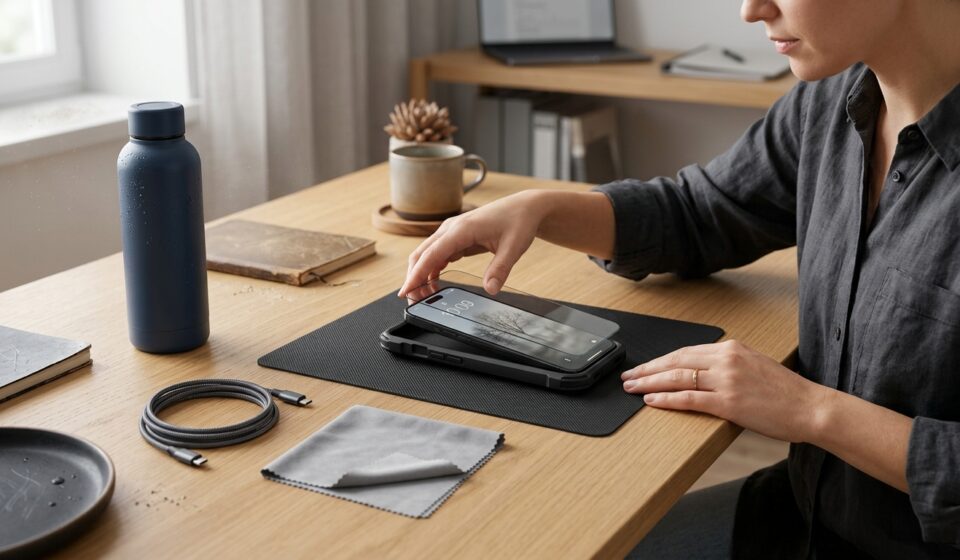
A properly fitted screen protector can help reduce everyday scratches. Some protectors can also provide additional resistance against minor impacts. Nevertheless, they should not be treated as a replacement for careful handling.
Avoid placing the phone face down on rough surfaces. Sand and small particles can create scratches when the screen moves against them. Cleaning the display regularly can also remove abrasive particles before they cause surface wear.
Keep Your Phone Away From Water
Moisture is another common source of smartphone problems. Modern phones may have water or dust resistance ratings, but those ratings do not make them completely waterproof.
Apple explains that water resistance can decrease through normal wear. The company also advises against intentionally submerging an iPhone or exposing it to activities such as swimming and showering.
Keep your phone away from sinks, pools, bathtubs, and heavy rain whenever possible. Be especially careful when using the device around drinks. A small spill can enter openings around charging ports, speakers, or buttons.
If your phone becomes wet, do not immediately connect a charging cable. Apple recommends disconnecting cables and allowing the device to dry completely before charging.
Avoid using external heat sources to speed up drying. Apple also advises against inserting foreign objects into the charging connector.
Protect the Charging Port
The charging port receives frequent use, so it can collect dust and debris. Repeatedly inserting a cable can also cause gradual wear.
Avoid forcing a charging cable into the port. If the connector does not fit normally, check whether debris or another obstruction is present. A damaged cable can also create charging problems.
Inspect charging cables regularly for fraying, bent connectors, or other visible damage. Apple recommends discontinuing use of damaged cables and keeping connectors clean and dry.
When removing a cable, pull from the connector rather than the cable itself. This habit reduces unnecessary stress on the cable.
Avoid Extreme Temperatures
Heat can affect both phone performance and battery longevity. Leaving a phone inside a parked car can expose it to temperatures beyond its recommended operating range.
Apple states that iPhones are designed for use between 0°C and 35°C. The company warns that prolonged exposure to excessive heat can shorten battery life permanently.
Avoid leaving your phone on a dashboard under direct sunlight. Do not place it near heaters, radiators, ovens, or other hot surfaces.
Heavy gaming, navigation, video recording, and wireless charging can also make a phone warmer. These activities are generally normal, but excessive heat should not be ignored.
If your device becomes unusually hot, move it away from direct sunlight. Let it return to a normal temperature before continuing demanding activities.
Charge Your Phone Carefully
Charging habits can influence battery condition over time. Use a compatible power adapter and a suitable charging cable for your device.
Google recommends using the power adapter supplied with a Pixel phone or a compatible charger recommended by the manufacturer. It also advises keeping the device cool during charging.
Avoid charging your phone under blankets, pillows, or other materials that restrict ventilation. Apple recommends keeping the phone, adapter, and wireless charger in a well-ventilated area.
Heat is especially important during charging. Batteries naturally become warmer while charging, and excessive heat can reduce battery lifespan.
Modern phones include charging features designed to manage battery health. Therefore, there is generally no need to repeatedly drain a battery completely before charging it.
Keep Your Phone Clean
Dust and debris can accumulate around buttons, speakers, cameras, and charging ports. Regular cleaning can help maintain the device’s appearance and functionality.
Use a soft, lint-free cloth to clean the phone’s exterior. Avoid applying cleaning liquids directly to openings or ports.
Apple recommends using a soft, lint-free cloth for removing dust and debris. It also advises against using cleaning products or compressed air inside the charging connector.
Clean the camera lenses carefully because fingerprints can reduce image quality. However, avoid excessive pressure around lenses and other sensitive components.
Be Careful With Your Phone While Driving or Moving
Phones are especially vulnerable when people use them while walking, cycling, driving, or carrying other objects.
Using a phone while walking can make it easier to drop the device. Distractions can also cause accidental collisions with walls, furniture, vehicles, or other people.
Never handle your phone while driving. Use approved hands-free features when necessary and follow local traffic laws.
When walking with your phone, keep a secure grip. Avoid holding the device loosely between your fingers when moving through crowded areas.
Avoid Carrying Your Phone With Sharp Objects
Keys, coins, tools, and other hard objects can scratch a phone. They can also put pressure on the screen when stored together.
Use a separate compartment in your bag or pocket whenever possible. Keep sharp objects away from the display and camera lenses.
If you carry your phone in a pocket, place the screen toward your body. This can reduce direct contact between the display and other objects.
Also, avoid sitting on a phone placed inside a back pocket. Pressure can damage the screen, frame, or internal components.
Pay Attention to Warning Signs
Small changes in phone behavior can sometimes indicate developing problems. Unusual heat, rapid battery drain, unexpected shutdowns, flickering displays, or charging interruptions deserve attention.
A swollen battery is particularly important. If the phone’s screen or back begins separating from the frame, stop using the device and seek professional assistance.
Apple advises discontinuing use when an iPhone or its battery is suspected to be damaged. It also recommends having battery repairs performed by trained technicians.
Ignoring warning signs can allow a minor issue to become more complicated. Early inspection may help identify the source before additional components are affected.
Keep Software Updated
Physical protection is important, but software maintenance also matters. Manufacturers regularly provide updates that improve security, stability, compatibility, and device functionality.
Install updates from trusted sources and maintain enough storage space for the process. Before major updates, consider backing up important photos, contacts, documents, and other information.
A backup can also protect your data if the phone experiences unexpected hardware failure later.
Back Up Important Data Regularly
Physical protection cannot prevent every type of failure. Phones can still experience hardware faults, software problems, loss, theft, or accidental damage.
Regular backups help protect important information when something unexpected happens. Photos, contacts, messages, documents, and other valuable files can be difficult to replace.
Use a trusted cloud service or computer backup system. Check occasionally that your backups are completing successfully.
Keeping more than one copy of important information provides additional protection. This becomes especially useful before traveling or having a device serviced.
Avoid DIY Repairs Without Proper Knowledge
Online repair guides can make smartphone repairs look straightforward. However, modern phones contain delicate components and tightly packed assemblies.
Opening a device without appropriate tools or experience can damage connectors, screens, batteries, or other components. Apple specifically recommends having iPhone repairs performed by trained technicians.
Battery work deserves particular caution. Lithium-ion batteries can be damaged by punctures, crushing, or improper handling.
If a phone has a swollen battery, cracked internal component, or significant liquid exposure, avoid attempting a home repair. Professional assessment is safer for complicated hardware problems.
What to Do After an Accidental Drop
Accidental drops can happen even with a protective case. After a significant impact, check the phone carefully before continuing normal use.
Look for screen cracks, unusual gaps, damaged cameras, loose buttons, or changes in charging behavior. Test essential functions without applying unnecessary pressure to the device.
A phone can sometimes experience internal damage without obvious exterior cracks. Therefore, unusual behavior after a major impact should not be ignored.
If the device becomes hot, shuts down repeatedly, or develops battery problems, stop using it. Professional inspection can help determine whether internal components were affected.
Build Simple Protection Habits
The best phone protection strategy is often a collection of small habits. Keep the device away from water and extreme temperatures. Use a suitable case and screen protector.
Handle charging cables carefully and avoid using damaged accessories. Keep ports clean and avoid forcing connectors into place.
Also, pay attention to changes in battery performance and device temperature. Early warning signs can provide useful information about developing problems.
Most importantly, avoid unnecessary risks. Do not place your phone near the edge of a table or leave it exposed in direct sunlight. Simple precautions can prevent many avoidable accidents.
Final Thoughts
Protecting a phone from everyday damage does not have to be complicated. A protective case, careful charging, proper cleaning, and safe handling can reduce many common risks.
Water, heat, drops, dust, and damaged charging accessories can all affect a phone’s performance. Therefore, prevention should become part of your regular device routine.
Battery care is equally important. Keeping a phone away from excessive heat can help preserve battery performance over time. Using compatible charging equipment can also reduce avoidable charging problems.
Finally, pay attention to unusual symptoms. Cracks, swelling, overheating, charging failures, and unexpected shutdowns should not be ignored.
With consistent care, users can reduce unnecessary wear and help their phones remain reliable for longer. Good protection starts with simple daily decisions and continues through regular maintenance.